Chrome vs Edge in 2026: Which is the better browser?
A direct comparison of Chrome and Edge covering performance, artificial intelligence, and user experience.
In 2026, the web browser is no longer just a window to the internet; it is a complex operating layer powered by AI and deeply integrated with cloud services. While Google Chrome still dominates the market share due to its Google Workspace ties and mobile presence, Microsoft Edge has technically outpaced it in resource efficiency and AI features.
Performance and Resource Efficiency
Both browsers are built on the same open-source Chromium foundation, meaning basic web compatibility is identical. However, their engineering philosophies vastly differ.
Raw Speed: Google engineers optimize Chrome for pure speed and JavaScript execution throughput. As a result, Chrome slightly edges out Microsoft in synthetic speed benchmarks like Speedometer 3.0 and JetStream 2.
Memory Usage (RAM): Edge uses Windows’ “Segment Heap” and an aggressive “Sleeping Tabs” feature to freeze inactive tabs and swap them to disk. Because of this, Edge can consume 20-30% less RAM than Chrome under heavy workloads. While Chrome has a “Memory Saver” mode, it is more conservative and tends to use more memory.
Battery Life: Edge deeply integrates with the Windows power scheduler via “Efficiency Mode,” extending laptop battery life by 30 to 60 minutes over Chrome during mixed browsing. Chrome’s “Energy Saver” operates at the application layer, making it slightly less effective.
AI in Browsers: Copilot vs. Gemini
Generative AI integration is the defining feature of 2026 browsers.
Microsoft Edge (Copilot): Edge acts as an advanced “Web Companion”. Copilot is structurally integrated into Edge and can “see” the active webpage’s Document Object Model (DOM). You can ask Copilot to summarize long PDFs or analyze images on the page without copying and pasting. It also features commercial data protection for enterprise users.
Google Chrome (Gemini): Chrome shines as a “Workspace Companion”. It uses “Gemini Nano” for on-device AI, keeping tasks like real-time translation and writing assistance fast and private. Chrome’s AI can seamlessly pull data directly from your Google Drive, Gmail, and Calendar to draft content.
Design, Features, and the “Bloat” Problem
The user experience comes down to a choice between minimal design and maximum productivity.
Productivity Tools: Edge leads in native multitasking with features like Vertical Tabs (essential for wide monitors) and a robust Split Screen tool. Edge also offers “Workspaces” for team collaboration and “Collections” for research gathering.
Simplicity: Chrome maintains a clean, minimalist interface. However, it lacks native vertical tabs, forcing users to rely on clunky third-party extensions.
The Bloatware Controversy: Edge receives heavy criticism for feature creep and aggressive monetization. By default, Edge pushes shopping sidebars, gaming feeds, and sponsored news content, prompting a wave of power users to use scripts to “de-bloat” the browser. Chrome avoids this clutter entirely.
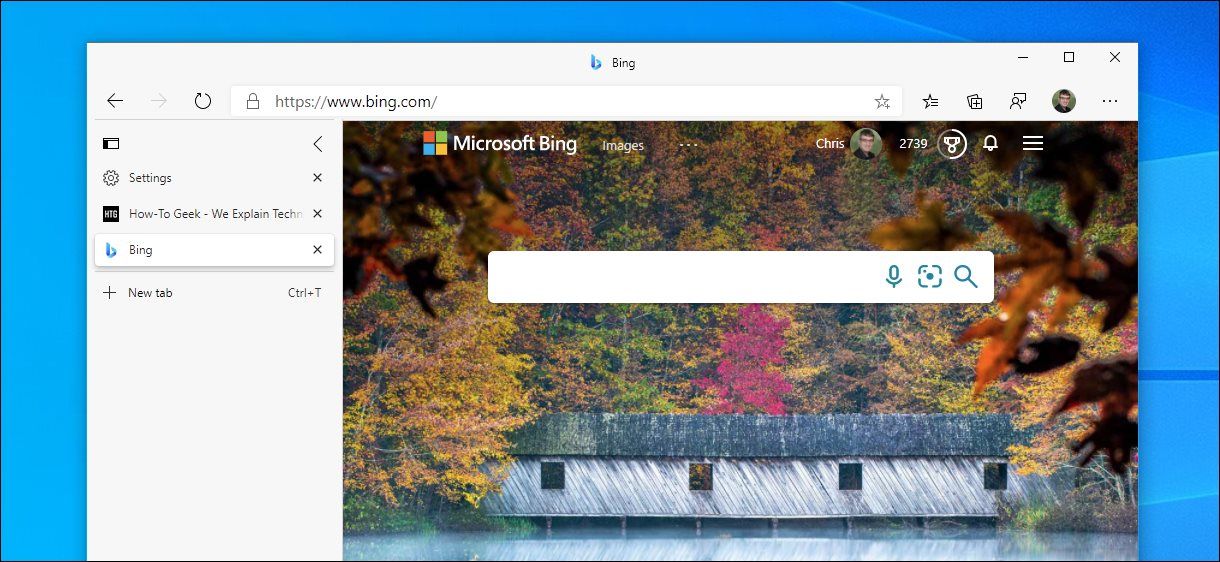
Vertical tabs on Edge
Privacy and Mobile Ecosystems
Your stance on tracking and your choice of smartphone play a huge role in this decision.
Privacy & Cookies: Google canceled its plans to remove third-party tracking cookies in Chrome, opting instead to give users a one-time “User Choice Prompt”. Edge takes a stricter approach, setting its default tracking prevention to “Balanced” (which blocks known trackers) and includes a free built-in Cloudflare VPN.
Mobile Experience: Chrome is the undisputed king of Android, offering instantaneous syncing and the engaging Google Discover feed. Conversely, Edge’s mobile app is praised for ergonomics (bottom navigation) and a built-in ad blocker that Chrome lacks.
Head-to-Head Summary
Best Browser by User Profile
Practical Recommendation
When to Choose Google Chrome
- You rely heavily on Android and Google account workflows.
- You want the most predictable compatibility with modern web apps.
- You prefer a cleaner browser UI with less built-in surface area.
When to Choose Microsoft Edge
- You want better efficiency on Windows laptops and long sessions.
- You benefit from native productivity features like vertical tabs and split-screen.
- You are in enterprise environments using Microsoft 365 and Intune.
FAQ
Is Edge faster than Chrome in 2026?
In most real-world use, both are close on raw speed. Chrome often leads in synthetic JavaScript benchmarks, while Edge usually feels faster under heavy multi-tab workloads due to lower memory pressure.
Which browser uses less RAM: Chrome or Edge?
Edge generally uses less RAM when many tabs are open, mainly due to Sleeping Tabs and Windows-level memory optimizations.
Which browser is better for battery life on Windows laptops?
Edge is usually the better choice for battery life on Windows thanks to Efficiency Mode and tighter OS-level power integration.
Conclusion
Chrome is the stronger choice for Google-centric and Android-heavy workflows, while Edge is generally better for Windows efficiency, enterprise controls, and built-in productivity tools.